
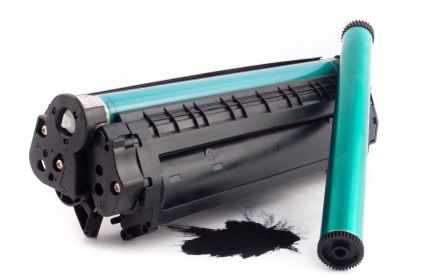
Printer performance depends on small internal parts that many users ignore until print quality drops. Two of the most important parts in laser printing systems are the drum unit and the imaging unit. These components control how toner is transferred to paper and directly affect sharpness, clarity, and consistency.
Across Canada, home users, offices, schools, and print shops rely on laser printers for daily work. When prints start showing streaks, fading, or uneven marks, the issue often traces back to these units. Understanding how they work helps you reduce costs, improve output, and avoid unnecessary printer replacement.
Toner Ink Canada supports customers across Canadian regions with replacement parts, printer consumables, and compatibility help for multiple printer brands, including Brother, HP, Canon, and Lexmark.
A drum unit is a light-sensitive cylindrical component inside laser printers. It receives an electrical charge and transfers toner onto paper. The imaging unit is a broader system that often includes the drum along with cleaning blades and charge rollers in a single assembly, depending on printer design.
Some printers separate the toner cartridge and the drum unit. Others combine them. In many Brother printers, for example, toner and drum are separate. In many HP models, they are combined in one cartridge.
The drum surface is highly sensitive. Even small scratches or dust particles affect print quality. The imaging unit controls the full image creation process from receiving laser signals to final toner placement.
How these units function in real printing
The printing process follows a precise sequence:
• The printer receives a print command
• A laser beam draws the image on the drum surface
• The drum receives an electrostatic charge pattern
• Toner particles stick to charged areas
• Paper passes through and picks toner from the drum
• Heat and pressure fuse toner onto paper
This cycle repeats for every page. Even a minor fault in the drum or imaging system leads to visible defects on prints.
In Canadian offices where high-volume printing is common, these parts undergo continuous stress. This is why regular replacement becomes essential for stable performance.
Although often used together, these components have differences based on printer design.
Drum unit characteristics
• Works as the image transfer surface
• Has a limited life cycle measured in pages
• Usually replaced after several toner cycles
• Sensitive to light and physical damage
Imaging unit characteristics
• May include drum plus cleaning and charging components
• Handles the full image formation process
• Found in more advanced printer systems
• Designed for longer operational stability
In simple terms, the drum is one part of imaging, while the imaging unit is a complete system in some printer models.
Different printer brands use different configurations. Understanding compatibility helps avoid waste and performance issues.
Brother printers
Most Brother laser printers use separate toner and drum systems. Drum units typically last for thousands of pages depending on model and usage pattern.
HP printers
Many HP laser printers use combined toner and drum cartridges. Replacement happens in one step, making maintenance simpler but sometimes more expensive.
Canon printers
Canon systems vary. Some models use separate imaging units, while others use integrated cartridges. Print quality remains high due to advanced laser control systems.
Lexmark printers
Lexmark printers often use long-life imaging systems designed for heavy office environments in Canada.
Toner Ink Canada provides compatible options for all these systems to support both home and business users.
Signs your drum or imaging unit needs replacement
Ignoring warning signs leads to poor print quality and wasted paper. Common symptoms include:
• Vertical black lines on pages
• Faded or uneven print areas
• Repeated marks at regular intervals
• Gray background on printed pages
• Missing text or broken characters
• Paper smudging after printing
In Canadian winter conditions, static buildup and dry air can also affect print consistency, increasing wear on these components.
A small accounting office in Toronto using a Brother laser printer started noticing faded reports and repeated streak marks. Toner replacement did not fix the issue. After inspection, the drum unit had reached the end of its life after printing nearly 12000 pages.
Replacing the drum restored full print clarity. This shows how toner alone is not always the cause of poor output.
Another example comes from a home user in Calgary printing school assignments. The printer produced gray background shading. Cleaning the imaging unit resolved the issue without full replacement, showing that maintenance can sometimes extend part life.
Proper handling increases lifespan and reduces printing costs.
• Keep the printer in a dust-free environment
• Avoid exposure to direct sunlight
• Use consistent quality toner
• Do not open the drum surface unnecessarily
• Power off the printer when not in use for long periods
• Run cleaning cycle when print quality drops slightly
In Canadian offices with heavy workloads, scheduled maintenance every few months keeps performance stable.
Selecting the correct drum or imaging unit depends on:
• Printer model number
• Page yield requirement
• Color or monochrome printing needs
• Frequency of printing
• Budget considerations
Using incompatible parts leads to poor alignment, wasted toner, and printer errors. Toner Ink Canada helps users match correct parts based on printer specifications, ensuring smooth installation and reliable output.
Drum units and imaging systems vary in cost depending on brand and capacity.
• Entry-level home printers use lower-cost drum units
• Office printers require higher-yield components
• Heavy-duty printers use long-life imaging systems
In many Canadian businesses, replacing drum units at proper intervals reduces long term maintenance costs and prevents printer damage.
Replacing a drum or imaging unit follows a simple process:
• Turn off the printer
• Open front cover
• Remove toner cartridge assembly
• Detach the old drum or imaging unit
• Insert new unit securely
• Reinstall toner cartridge
• Close the cover and power on the printer
• Print test page
Most modern printers include clear indicators for replacement, making the process user-friendly even for beginners.
Used drum units should not be discarded in regular waste. Many parts contain materials that require proper recycling. Canadian recycling programs support the responsible disposal of printer consumables.
Toner Ink Canada encourages users to follow recycling practices to reduce electronic waste and support environmental safety.
Toner Ink Canada focuses on providing reliable printer consumables for households, businesses, and institutions across Canada. The service helps users find the correct drum units, imaging systems, and toner cartridges for multiple brands.
Benefits include:
• Wide compatibility across printer models
• Support for both home and office printing
• Reliable replacement parts
• Cost-effective printing solutions
• Assistance in selecting the correct components
This ensures users avoid incorrect purchases and maintain consistent print quality.
Many printing issues come from simple mistakes:
• Replacing toner when the drum is actually worn
• Ignoring warning indicators
• Using incompatible cartridges
• Cleaning the drum surface directly by hand
• Delaying replacement after print quality drops
Avoiding these mistakes improves printer life and reduces operational costs.
What is the main role of a drum unit
It transfers toner onto paper using an electrostatic charge process.
Is the imaging unit the same as a toner cartridge
No. Toner stores powder. The imaging unit forms the image and transfers it to paper.
How long does a drum unit last in Canadian usage conditions
Most drum units last between 12000 and 50000 pages, depending on printer model and usage volume.
Why do prints show lines even after toner replacement?
The drum surface may be worn or damaged and needs replacement.
Can I clean a drum unit?
Light cleaning is possible, but direct contact with the drum surface should be avoided.
What happens if I ignore a worn drum?
Print quality continues to decline and may damage other printer components over time.
Do all printers use separate drum units?
No. Some printers combine drum and toner in one cartridge.
Drum units and imaging systems play a central role in laser printing performance. They control how images appear on paper and directly impact clarity and consistency. In Canada, where printing needs range from home tasks to large office workloads, understanding these components helps reduce costs and improve efficiency.
Toner Ink Canada supports users with reliable replacement options and compatibility assistance for different printer brands. Choosing the right drum or imaging unit ensures stable output, fewer interruptions, and longer printer life.